The "flash" in the title means that the devices utilize a type of flash memory that can be written on to and erased numerous times. They are great for TRANSPORTING files from one device to another. They are NOT meant to store files long term, as in being a "backup" device. They should not be used as such.
Flash Drive Risks
What Are Flash Drives?
Types of Flash Drives
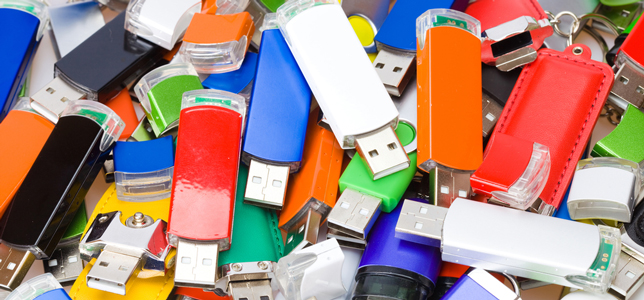
These type of flash drives come in all sorts of shapes and colors. There are SLOW ones that are a USB 2.0 standard, and much FASTER ones that are USB 3.2. There are some that have only 2-4 gb memory, but others that can go up past 256 gb memory. Many of the older types use a Type A interface like those seen in the image here. However, the newer and more secure flash drives now use a Type C interface that is smaller.
What Size Flash Drive Do I Need?
A 16 gb Flash Drive is really all you need, unless you are digitizing 4 or more long home video tapes. You can store a LOT of photos and documents on a 16 gb flash drive. Once you are home, these files will be transferred and no longer kept on your USB device. And, of course, once you have transferred your files to your PC, you will be backing them up to at least one other backup device.
How Long Do They Last?
Use your brand new flash drive ONCE and it will retain information for about 10 years (at least assumed).
Use the device frequently to read and write data, and you can expect about 3-5 years of use before data integrity becomes a big consideration.
I See a Folder Named LOST.DIR on My USB Drive.
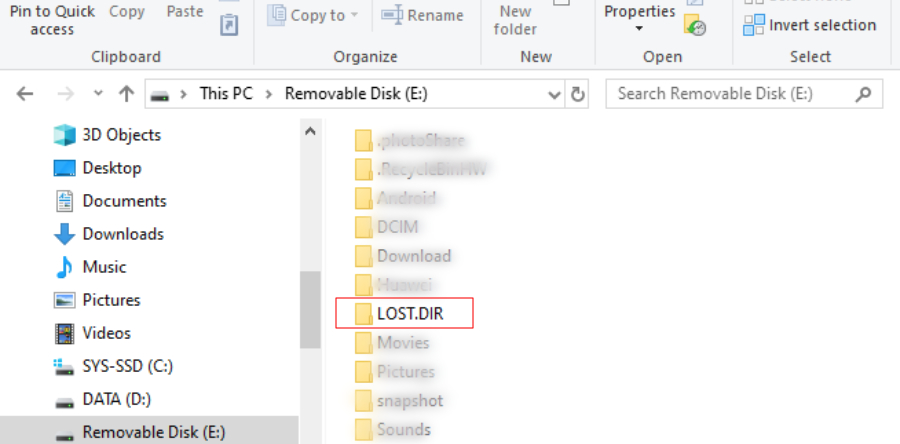
If you run across this issue, you have lost a folder of files due to corruption in your USB drive. I see this fairly commonly with patron flash drives. Remove what good files you have on the USB drive and move them to another drive. Reformat the drive before using it again. Reformatting should remove access to corrupted memory areas, but you will notice a drop in the storage size. You can use this USB device for awhile but I would seriously be thinking about purchasing a new one to use.
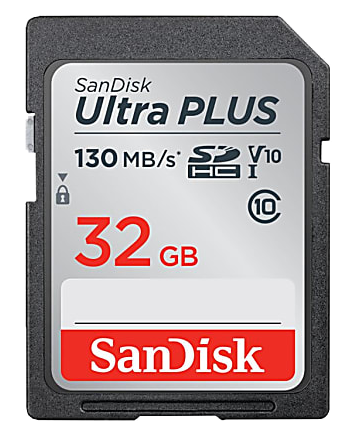
SD Cards also fall into this same category of flash drives. They are all the same shape and size and have a different style port to insert into. Both the storage and speed of the SD Card will vary depending on what you will use it for. They are actually probably safer than the Type A flash drives, in that they have no firmware interface in them that can carry malicious content. This is described below.
Should I Buy a USB 2.0 or USB 3.x Flash Drive?
1) USB 2.0 - 16 gigabyte flash drives will cost about $3-4 per flash drive. This standard has been around since the early 1980s and is now considered old technology.
2) USB 3.0 - 16 gigabyte flash drives will cost about $3-5 per flash drive. On Amazon, a 16 gb drive is difficult to find as they typically come in 64gb or larger sizes. This standard emerged about 2009 and transfers information TEN times faster than a USB 2.0 flash drive.
Consider this:
* Buy a 1 terabyte (or 1,000 gigabyte) USB 3.x HARD drive for about $50. That is the equivalent of about 62 - 16 gigabyte USB Type A/C flash drives which would cost you around $500. Why would anyone buy that many flash drives?
* Just FYI, a 4 terabyte USB 3.x hard drive is less than twice the price (<$100), making it a better deal.
* In general, the external USB Hard Drive is used for the backup of your files that are centrally organized on your computer's hard drive.
In general, the external USB Hard Drive is used for the backup of your files that are centrally organized on your computer's hard drive. If you DO use a USB 3.x hard drive, such as to store scanned photos/documents while at the Center, be sure to copy them to your main PCs hard drive at home. Use your PC’s hard drive as the “principal” drive, and the USB hard drive as your “backup” drive.
One other IMPORTANT thing … when you purchase a flash drive, buy a name brand one, not the cheap generics, like on Amazon, that are made in China and can come with other malicious garbage on them. Name brands include Sandisk, Verbatim, PNY, Kingston, Samsung.
Name brand USB 3.x hard drives would be like Western Digital (or WD), Seagate, & LaCie (typically more pricey than the first two). Over the years, I have had only 1 hard drive fail of the above 3 brands, versus the generics I have found on Amazon for example.
How Many Flash Drives Do I Really Need?
Maybe one or two. Since you are only using them to temporarily hold the files that you are transferring from one computer (or location) to another, ONE flash drive is really all you need, unless you are digitizing some big video files.
Remember, these are temporary transport devices, NOT storage/backup devices.
And Now … The Security Risks
I Found a USB Flash Drive … Is It Okay to Use?
Would you lick an ice cream cone found on the street?
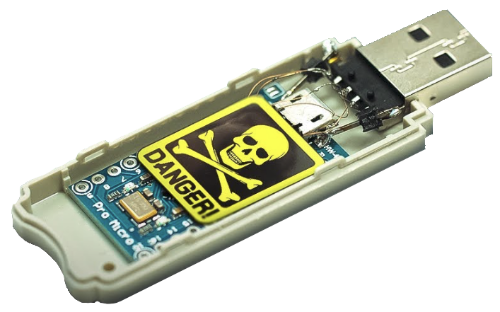
Now for the "bad news" about USB devices (flash drives, USB cables, keyboards, mice, and so on.) This does not include bluetooth enabled devices where there is no physical connection with your PC. It is that physical Type A USB connector that plugs into your PC that is worrisome.
There are two inside components to a USB flash device. There is the RAM or memory area, and then the “firmware” area that helps sit between your PCs USB port and the USB device’s RAM to help your PC access the RAM (read only memory). It is the firmware that can be pre-programmed at the factory source, or anyone with the ability to flash the firmware, to deliver all sorts of malicious stuff to your PC once it plugs into the USB port.
RAM or the memory area of your USB can be scanned using anti-virus software to root out bad stuff on your USB device. However, there is no way to scan the firm-ware part of the USB device. You get what you pay for, so again be warned to avoid cheap USB devices. Those cheap cables or USB devices on Amazon, etc? You will never know that anything is wrong with the USB device.
Would you use another friend’s USB device on YOUR PC? Or how about if you found a 512 gb (nice size) USB device on the street, or in your mailbox? Would you use it? I would hope not because you know nothing about how and where the device was manufactured. Just toss it! Returning back to the friend’s USB device question, my recommendation is to avoid another person’s device. Again, you don’t know where it has been.
Once the malware has been uploaded to your PC from the USB device’s infected firmware, the “fun” starts. Every single Type A USB device can be programmed now to spread the malicious software, keyboards, mouse, trackpads, other storage devices, and such. Think about your keyboard. It’s just an input device, right? If there is key-logging software programmed into your keyboard’s firmware and you are entering passwords and such, whatever is typed can be passed on to the hacker’s site invisibly.
The very same issue of firmware interface programming is also true for USB Type A cables. It is that plug-in end that can create malware nightmares. This is why the USB Type C cables were developed. There is NO interface firmware in them. They are just a cable connected between a USB device and the PC.
I may sound paranoid, but all of this cybersecurity stuff is very real and concerning, and we need to stay safe in today’s world. Avoiding the use of non-brand name USB flash devices can go a long way to protect you from malicious intrusions into your PCs data.
BE VERY AWARE OF HOW YOU USE THESE DEVICES!!! This is NOT going to be something that can be fixed with time. USB-Type A standards were compromised from the start. The newer USB-C standards are becoming more popular and are much faster as well. The extent of security built into this standard will be seen as time goes on.
