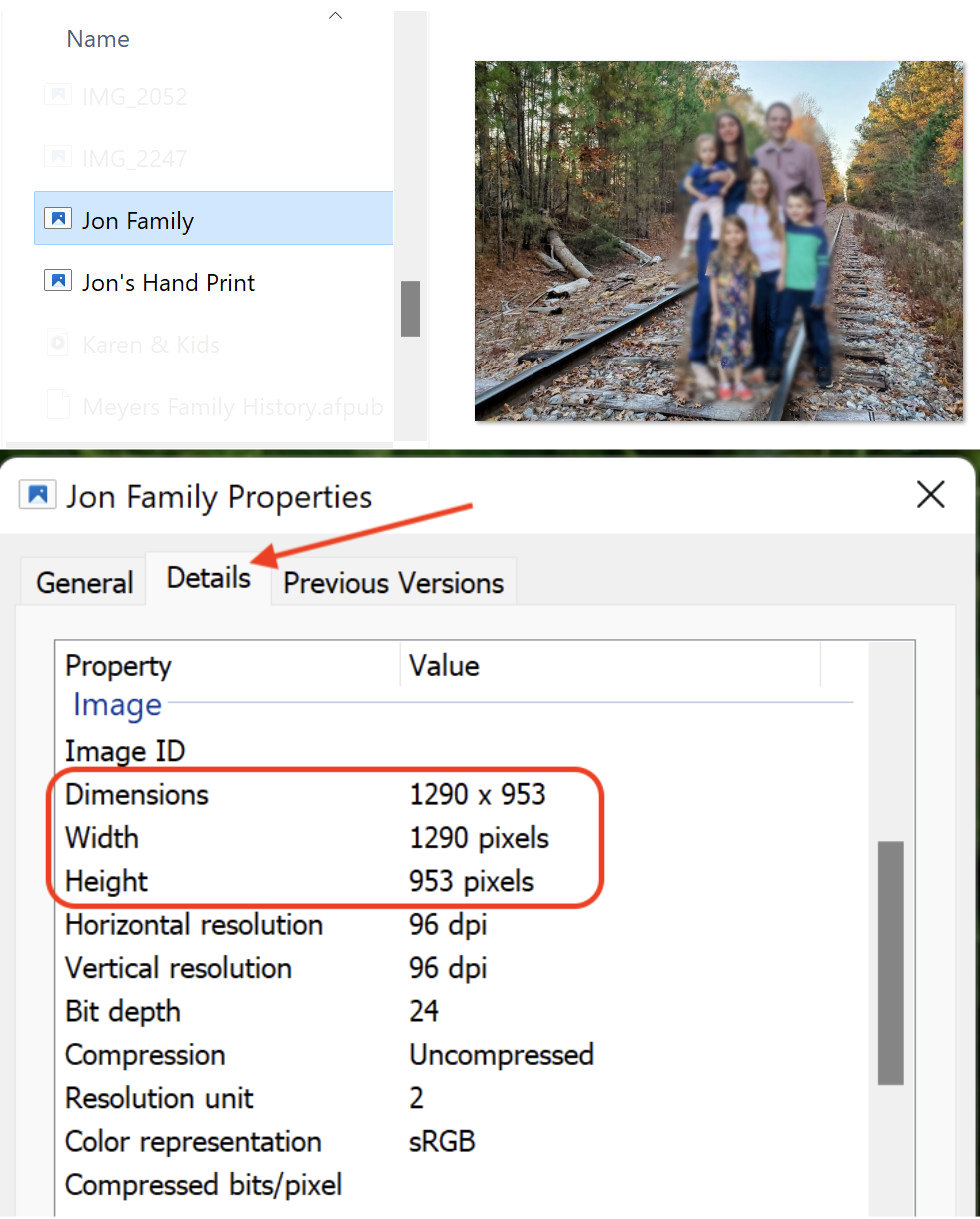
In the Windows File Explorer, right click on a photo’s filename and select "Properties" from the menu list. A dialog box will open. Click on the "Details" tab. Scroll down to the "Image" section.
Notice that the horizontal width of the photo is 1290 pixels and the vertical height is 953 pixels. The photo is too small to be printable with good quality to a 6” X 4” paper print. How do I know this?
A commercial quality printer prints at 300 DPI (or dots per inch). We simply need to calculate the minimal number of pixels needed to print to a 6” wide photo paper print.
Multiplying the 6” paper width by 300 tells us we need to have a minimum of 1800 horizontal pixels to make a good quality paper print. To print a digital image onto photo paper, the minimal dimensions for the image need to be pixels horizontally by pixels high.
The image above is only 1290 pixels horizontally, not the 1800 pixels needed, and so print quality will be affected. What would the print look like if it was printed? There would be pixelation and blurriness of the photo.
To summarize, simply take the largest side of your photo that you want to print to and multiply times 300. A 6” paper print would need to have a minimal of 1800 pixels to make a good paper print. If the dimensions of your image are much greater than the 1800 pixels, the image will still print fine. You could reduce the size of the image to something around the minimal pixels needed if you want to.
Below are some other calculations for different paper sizes for reference.