This question arises frequently from our library patrons, “Can I upload my family videos to FamilySearch?” The answer is pretty simple. Yes you can, but no ... you can’t do it directly. FamilySearch allows you to store your videos on a cloud drive like Google Drive, Microsoft OneDrive, other cloud services and even from YOUR YouTube account. So how does this work anyway?
Uploading Family Movies to FamilySearch?
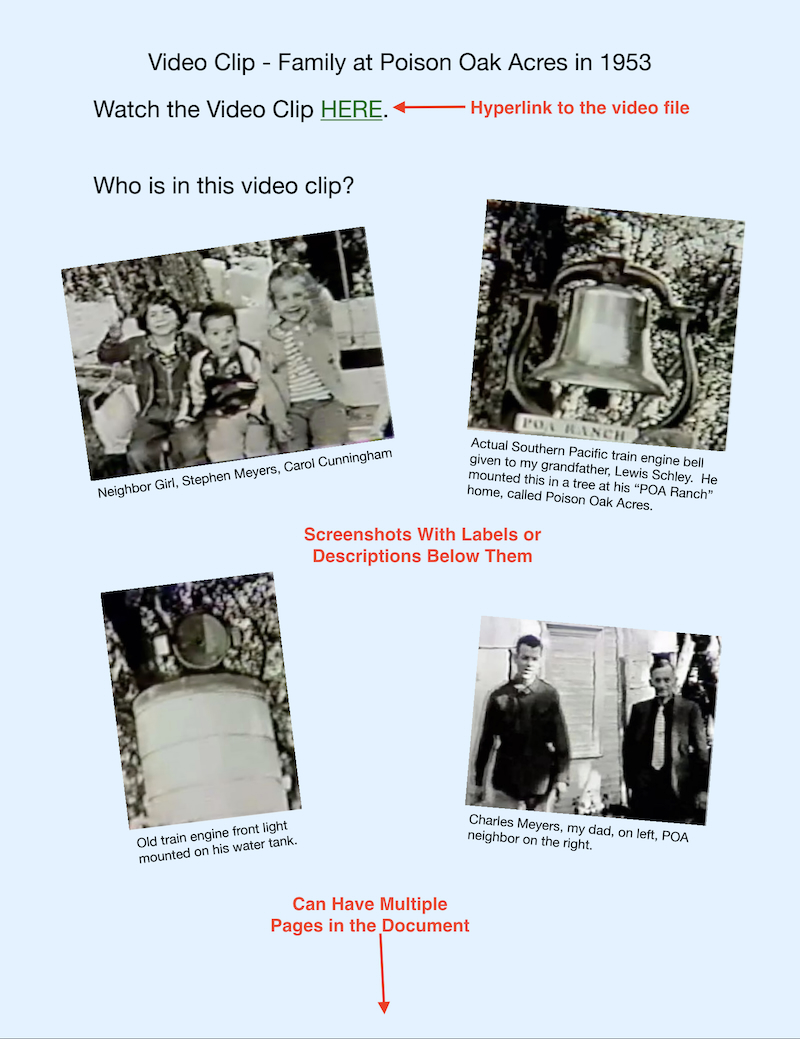
The process is pretty easy to accomplish. It involves creating a document such as the sample one to the right. The document is saved as a PDF file and then uploaded to FamilySearch. If you notice in the sample document, there is a “hyperlink” placed in the 2nd line that sits invisible behind the green “HERE” text. That hyperlink needs to have a permanent cloud drive home. If you change your cloud drive host, the link in the PDF document on FamilySearch will no longer work. It becomes a broken link.
There are a couple of options you can think about. If you utilize cloud providers like Google Drive, Microsoft OneDrive, and such, set up long term annual payments to keep hosting your video files, even after you pass way.
The other option is to purchase longterm or perpetual cloud storage. If you web search this, there are a fair number of providers to choose from. In the family history realm, FOREVER is probably the most well known. You pay a fairly good amount of money up front with the promise that your files will always be available to you. This is probably the best option for video files.
There is another long term storage option and that is utilizing YouTube. You will need a Google account, and then can utilize YouTube’s Channel. We’ll discuss how this channel works later. The advantages are that this is a free option, and YouTube will very likely be around for a very long time. The disadvantage is that after “whatever” number of people visiting your channel, they may start to put ads along the bottom of your videos.
For video files, utilizing long term storage might be a great option if you are planning on having the videos available on FamilySearch far into the future. For your documents, just keep them on a typical cloud drive, and upload what you want to FamilySearch. If you think about it, your local computer will always store a copy of your files, as well as those in the cloud. If your cloud drive expires, you still have your local computer ones. This case holds true for Windows and MacOS computers, but NOT Chrome Books. Everything you access utilizing a Chrome Book is only stored on your own Google Drive. Once you figure out where you want to store your video files LONG TERM, you can move to the next step.
Just remember that a document with just the hyperlink may not have any value to a grandchild who watches a lot of people, not knowing who they really are. You can’t technically “tag” videos like you can with photos, stories, or other documents. In the sample PDF document, you will notice screenshots with descriptive titles under each. By getting screenshots of the various individuals in the video clip and pasting these screenshots to the document, you can identify who these people are for your posterity. You may have several pages of screenshots and that’s okay.
So ... to recap. Find a LONG TERM storage option, create a link to an individual video file, paste that link into a document as a hyperlink, make some screenshots of the individuals in the video clip and paste them into your document with descriptions of each screenshot. Once this is completed, export your document as a PDF file. This file is then uploaded to FamilySearch. Complicated? Not really. If you still have questions, please contact me and I can help you through it. Just remember that your cloud storage really has to be PERMANENT or your hyperlink will break.
